
User Manual
Este conteúdo não está disponível em sua língua ainda.
This section provides a detailed description of each feature in the program. It explains how to create, edit, view, and analyze a deep foundation model, as well as how to use the different tools available in the interface.
The purpose of this manual is to serve as a reference for understanding the complete functionality of the software, from the initial project setup to the interpretation of results. You can consult it at any time to resolve specific questions about the use of a feature or workflow.
Input Parameters
Section titled “Input Parameters”Type of Analysis
Section titled “Type of Analysis”Analysis types allow you to add new calculations when running the model.

Currently, the following analysis types are available:
- Bearing capacity evaluation
- Elastic settlement evaluation: Not available for strip footings.
Foundation Soil
Section titled “Foundation Soil”The foundation soil is used to calculate the soil’s bearing capacity. Supports one (1) soil type.
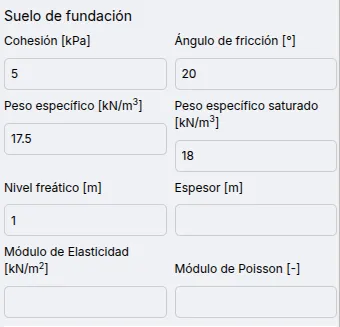
Available parameters for foundation soil are:
- Cohesion: Bearing capacity only.
- Friction angle: Bearing capacity only.
- Unit weight: Bearing capacity only.
- Saturated unit weight: Bearing capacity only.
- Water table level: Bearing capacity only.
- Thickness: Elastic settlement only.
- Elastic modulus: Elastic settlement only.
- Poisson’s ratio: Elastic settlement only.
Structure
Section titled “Structure”Rectangular/square and continuous (strip) structures are considered.
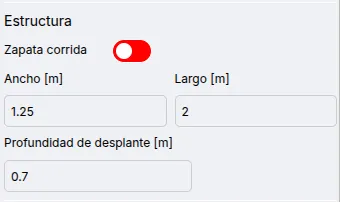
Available parameters are:
- Strip footing
- Width
- Length
- Embedment depth
Loads allow calculation of the safety factor and bearing capacity.
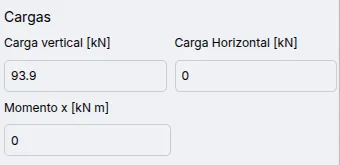
Available parameters are:
- Vertical load
- Horizontal load
- Moment
Results
Section titled “Results”Bearing Capacity Evaluation
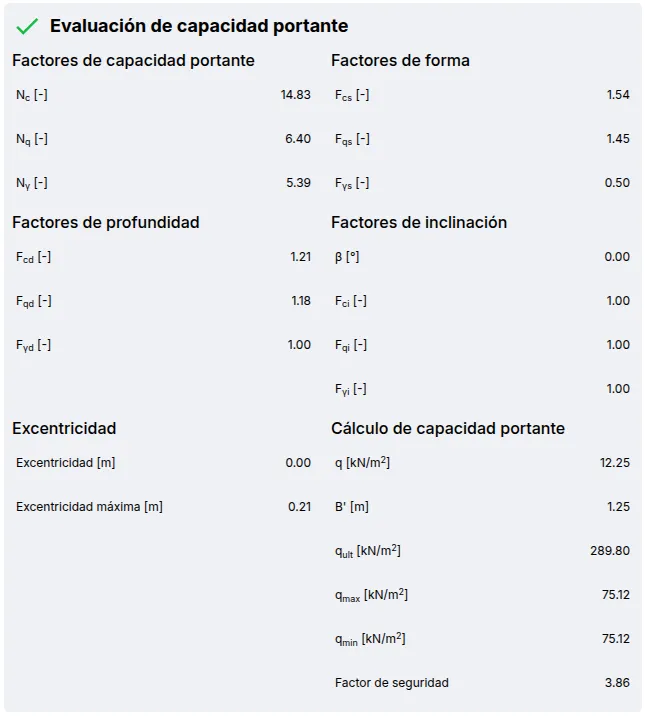
Section titled “Bearing Capacity Evaluation”Shows detailed parameters for bearing capacity calculation, along with the safety factor and eccentricity check. The safety factor is compared against a value of 2.0.
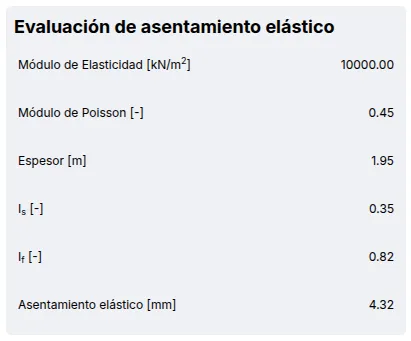
Elastic Settlement Evaluation
Section titled “Elastic Settlement Evaluation”Shows the factors for elastic settlement calculation.